🛠️ DevTools in nuxt-i18n-micro
Vue DevTools (browser extension)
In development, the module can register a Vue DevTools custom inspector and timeline via @vue/devtools-api. This is separate from the Nuxt DevTools tab below.
| Tool | Best for |
|---|---|
| Vue DevTools | Live locale, in-memory translation cache, $t timeline (debug: true), missing-key events |
| Nuxt DevTools tab | Editing JSON files on disk, config overview, import/export |
The vue-devtools plugin is registered only during nuxt dev (not in production builds). Dev-only bridge state in the main plugin is stripped by import.meta.dev dead-code elimination.
Disable the browser integration while keeping the Nuxt tab:
export default defineNuxtConfig({
  i18n: {
    vueDevtools: false,
  },
})
Verbose $t timeline events require debug: true.
📖 What Is Nuxt DevTools?
DevTools is a powerful development assistant seamlessly integrated into the nuxt-i18n-micro module. It provides an intuitive interface for managing localization and translation tasks, making your workflow faster and more efficient. Designed for developers who value convenience, Nuxt DevTools bridges the gap between coding and runtime management.
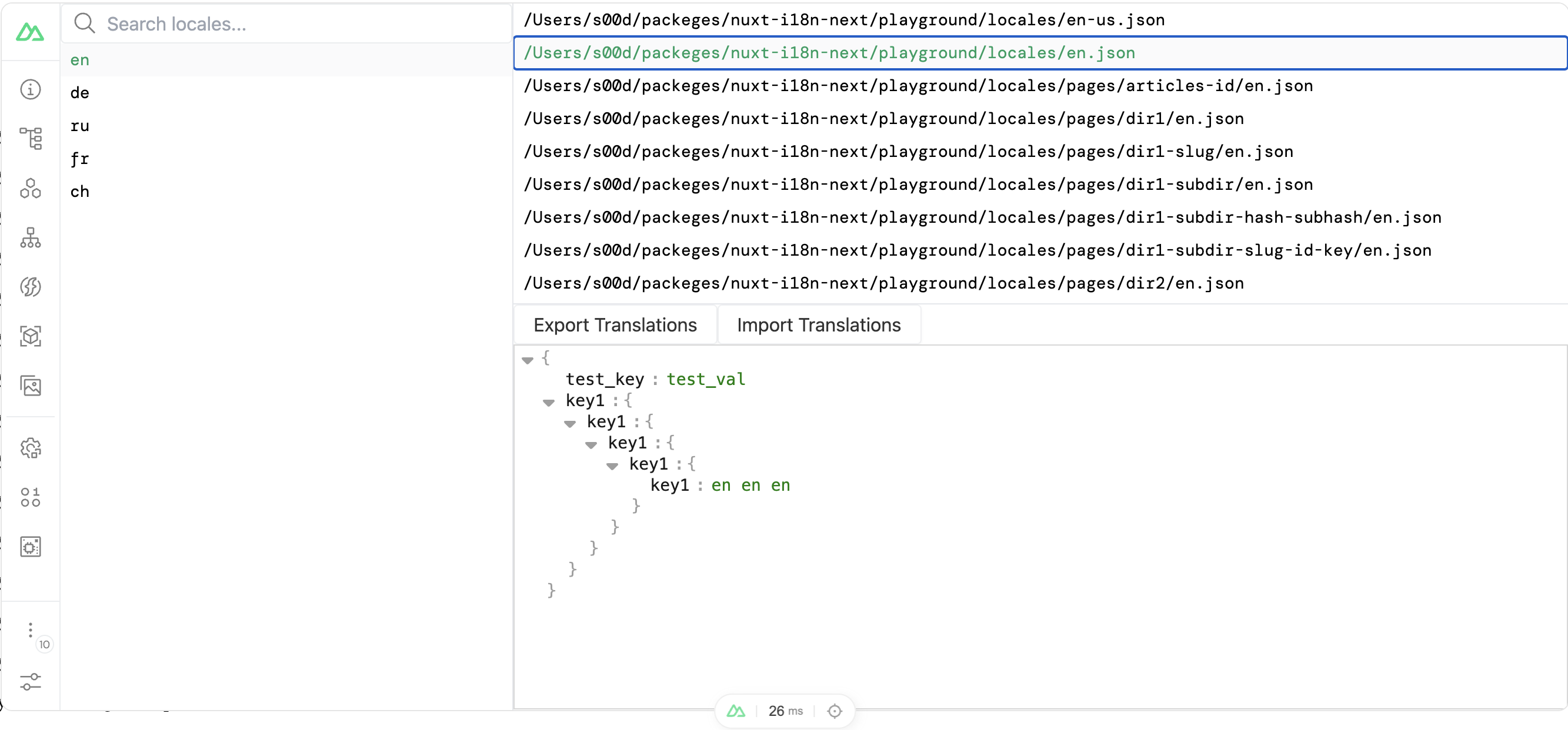
🌟 Key Features of DevTools in nuxt-i18n-micro
1. Locale Management
Effortlessly browse, select, and manage locales in your application. Whether you’re working with a single language or multiple, DevTools provides a centralized hub for handling all localization settings.
2. Translation Editing
Edit translation files directly through an integrated JSON editor. This eliminates the need for external tools, allowing real-time updates and changes without interrupting your workflow.
3. File Import and Export
Simplify the process of managing translation files:
- Export: Save translations as a JSON file for backups or external use.
- Import: Load updated translation files into the project to keep content up-to-date.
4. Real-Time Previews
View changes immediately within the development environment. This feature ensures translations and configurations are accurate before going live.
5. Seamless Nuxt Integration
DevTools works natively with nuxt-i18n-micro, enhancing its capabilities without requiring additional setup. It adapts to your localization needs while maintaining Nuxt's modular and flexible structure.
🛠️ Why Use DevTools?
Nuxt DevTools is an indispensable addition for projects requiring localization. It helps developers by:
- Saving Time: Automates repetitive tasks like file management and format validation.
- Reducing Errors: Provides a safe, intuitive environment for editing translations.
- Improving Collaboration: Enables non-developers to manage translations easily.
- Streamlining Workflows: Consolidates multiple localization tasks into a single interface.
🚀 Take Control of Localization
With Nuxt DevTools integrated into nuxt-i18n-micro, managing multilingual applications becomes straightforward and efficient. Whether you're fine-tuning translations or adding new locales, DevTools equips you with the tools needed to deliver polished, user-friendly experiences.