
Translation files
Translations are plain JSON files: one root file per locale for shared keys, and one file per page and locale for that page's keys. Read this when you add pages, share keys between them or set up fallbacks. You learn which file a key must go in, what a page can see, and when each file is loaded.
Layout
locales/
├── en.json                 # root: menus, footer, buttons
├── de.json
└── pages/
    ├── index/              # pages/index.vue
    │   ├── en.json
    │   └── de.json
    ├── about/              # pages/about.vue
    │   ├── en.json
    │   └── de.json
    └── products-id/        # pages/products/[id].vue
        ├── en.json
        └── de.json
- The folder under
locales/pages/is the Nuxt route name of the page:pages/products/[id].vueisproducts-id,pages/blog/[slug]/comments.vueisblog-slug-comments. - Keys can nest to any depth;
$t('auth.form.login')reads{ "auth": { "form": { "login": … } } }. translationDirmoves the folder ('locales'by default, relative to the project root, also under the Nuxt 4app/layout).- Missing files are created as
{}when Nuxt resolves the pages, unlessdisableWatcheris set.
What a page sees
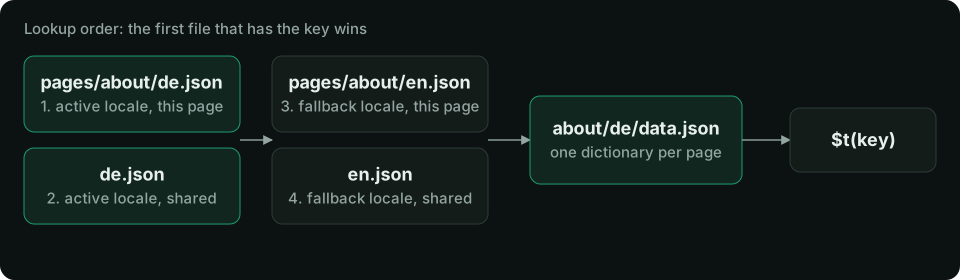
A page's dictionary is its root file merged with its page file, deeply (every level). The page file wins on a clash:
// locales/en.json
{ "title": "My shop", "nav": { "home": "Home", "cart": "Cart" } }
// locales/pages/about/en.json
{ "title": "About us", "nav": { "cart": "Basket" } }
// on /about
t('title') // 'About us'
t('nav.home') // 'Home'   (root)
t('nav.cart') // 'Basket' (page wins)
// on any other page
t('title') // 'My shop'
A page without its own folder gets the root dictionary alone. Keys of other pages are not visible.
Fallback locales
A key missing in the active locale is taken from its fallback locale before the key itself is shown:
// nuxt.config.ts
export default defineNuxtConfig({
  modules: ['nuxt-i18n-micro'],
  i18n: {
    locales: [
      { code: 'en', iso: 'en-US' },
      { code: 'de', iso: 'de-DE' },
      { code: 'de-at', iso: 'de-AT', fallbackLocale: 'de' },
    ],
    defaultLocale: 'en',
    fallbackLocale: 'en', // global, for every locale
  },
})
- A locale's own
fallbackLocaleis followed to its end:de-at→de→en. - The global
fallbackLocaleis the weakest layer, under every chain. - Each locale in the chain adds its root file, then its page file, from the weakest fallback up to the active locale. So the active locale's root file beats a fallback locale's page file.
Without a fallback, a missing key renders as the key ('nav.home') and logs a warning in the browser console in dev (missingWarn).
Sharing and other sources
| Need | Option |
|---|---|
Only root files, no pages/ folders | disablePageLocales: true |
| Two pages read one page folder | routesLocaleLinks: { 'about-us': 'about' } |
| Shared root files in another folder | additionalTranslationDirs: ['common'] (the main translationDir wins) |
| Keys from a Nuxt layer | Layers' files merge, the project's own files win. See Layers |
| Keys added at runtime | the i18n:register hook, $mergeTranslations, $setTranslation |
| Keys inline in a page component | $defineI18nRoute({ locales: { en: { … } } }), see Page config |
How a page loads its dictionary
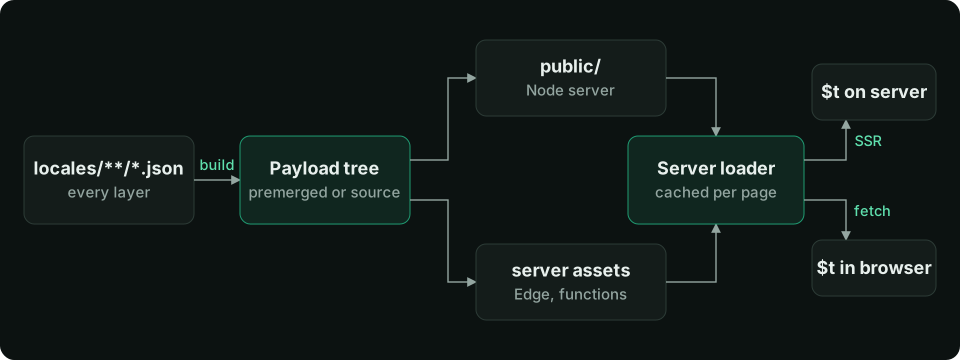
The module builds one payload per page and locale: /{apiBaseUrl}/{page}/{locale}/data.json (/_locales/about/de/data.json by default).
- Server render. Nitro detects the locale and the page loads its payload from the server loader directly, with no HTTP request. The dictionary is not written into the HTML payload, so pages stay small.
- Hydration. The browser fetches the same payload. The server already emitted a
<link rel="preload">for it, so the fetch starts with the HTML. - Navigation. The next page's payload replaces the dictionary. The leaving page's keys still resolve until it is gone (end of the page transition, or
page:finish), so a fading-out page does not flash raw keys. A chunk that fails to load (network error, 4xx or 5xx, a body that is not an object) leaves the current dictionary in place, and the next navigation loads it again. A failed locale switch is the same:$switchLocaleresolvesfalse, and calling it again, or clicking the switcher again, retries. Under the prefix strategies the URL has already moved by then, solangand$getLocale()name the URL's locale while the old texts stay on screen. - Cache. Loaded payloads are cached on the server and in the browser; Performance has the size and TTL knobs.
translationPayloads.mode decides how payloads are built. 'premerged' (default) writes every page × locale file at build time. 'source' keeps the source files and merges per request, which is smaller for large catalogs on Edge targets. Both give the same dictionaries. Where the files end up for each deploy target is on Deployment.
Editing in development
nuxt dev reads the files live. Saving a translation file refreshes the open page's dictionary in place: no reload, removed keys disappear, and a change to a root file reaches every page. A broken JSON file logs a warning with its path and is treated as empty. Set hmr: false to refresh by hand instead.